



Download Custom Cursor – free Chrome cursor personalization tool
Overview
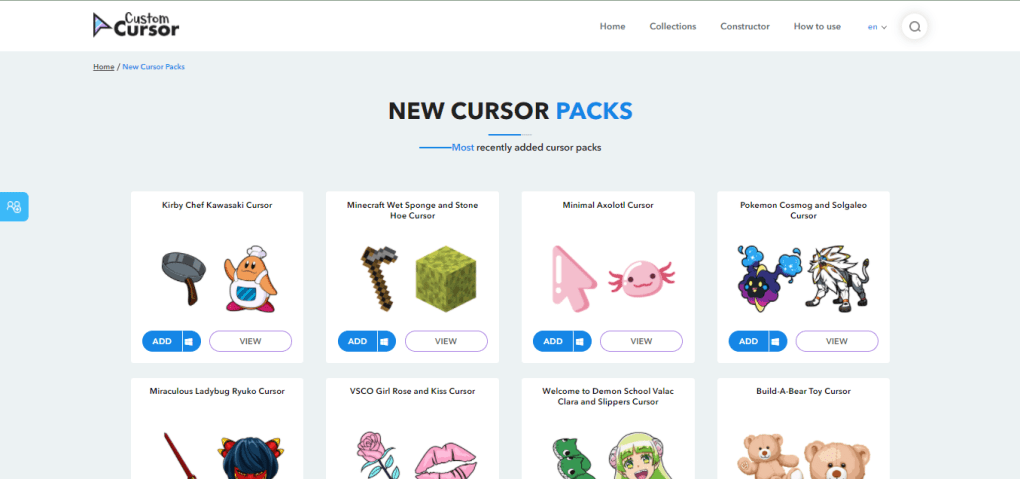
Custom Cursor is a playful yet functional Chrome extension created by the Blife Team that lets you give your web‑browser pointer a fresh look in seconds. Whether you are looking for a cute animal paw, a neon‑glow arrow, or a seasonal snowflake, the extension offers an extensive library of cursor designs that can be applied with a single click. The tool is completely free to download, requires no additional software, and works directly inside Google Chrome, making it an ideal solution for users who want to add a bit of personality to their browsing experience without compromising security or performance.
Beyond the pre‑made collection, Custom Cursor also allows you to upload your own cursor files, adjust the size of each pointer, and switch back to the default system cursor instantly. While the extension does not work on every website—some sites block custom cursors for security reasons—it still provides a reliable way to personalize the majority of everyday pages you visit. This review walks through the most important aspects of Custom Cursor, from its feature set to installation steps, compatibility notes, and the pros and cons that will help you decide if it’s the right fit for your Chrome setup.
Features, Installation & Usage
Key Features
- Over 1,500 ready‑to‑use cursor designs covering themes such as animals, food, holidays, and multimedia.
- Custom cursor upload – add your own .cur or .png files to the library.
- Size adjustment slider for precise control over cursor dimensions.
- Complementary hand cursor that appears alongside the main pointer for a cohesive look.
- One‑click activation from the Chrome extensions toolbar.
- Instant revert button to switch back to the default system cursor.
- Free of charge, with no hidden subscription fees.
- Secure installation through the Chrome Web Store, ensuring the extension is regularly updated.
How to Install and Use Custom Cursor
Installing Custom Cursor is straightforward. Start by opening the Chrome Web Store and searching for “Custom Cursor” or follow the direct link provided on the developer’s website. Click the Add to Chrome button, then confirm the permission request that appears. The extension will download and appear as a puzzle‑piece icon next to the address bar. No additional setup wizard is required.
Once the icon is visible, click it to open the cursor selection menu. You’ll see a thumbnail gallery of the most popular designs; clicking any thumbnail instantly applies that cursor to your browsing session. To fine‑tune the appearance, use the size slider located at the bottom of the menu – dragging it left shrinks the cursor, while dragging right enlarges it. If you have a personal cursor you’d like to use, select the “Upload” option, choose a .cur or .png file from your computer, and the extension will add it to your library for immediate use.
For users who prefer a clean default look, the “Reset to Default” button restores the operating system’s native cursor in a single click. The extension also includes a small “Help” link that opens a FAQ page inside a new tab, offering quick answers to common questions about compatibility and troubleshooting.
Compatibility, Pros & Cons, Frequently Asked Questions
Compatibility
Custom Cursor works exclusively as a Chrome extension, meaning it runs on any device that supports the Chrome browser, including Windows 10/11, macOS, Linux, Chrome OS, and Android devices with Chrome installed. Because the extension manipulates the cursor at the browser level, it does not affect other applications or the desktop environment. However, some websites that use strict Content Security Policies (CSP) or custom JavaScript may block external cursor files, causing the default pointer to appear on those pages. The extension also respects Chrome’s security updates, automatically receiving patches when Chrome itself is updated.
Pros
- Massive, regularly updated library of free cursor designs.
- Simple, one‑click activation without the need for system‑wide changes.
- Custom upload feature empowers users to personalize beyond the provided collection.
- Size adjustment prevents cursors from becoming overly large on high‑resolution displays.
- Instant revert button ensures you can return to the default cursor without restarting Chrome.
- Lightweight and does not noticeably affect browser performance.
- Completely free with no hidden fees or ads.
Cons
- Does not work on websites that enforce strict CSP or block external assets.
- Cursors are slightly larger than the native pointer even at the smallest size setting, which can obscure small UI elements.
- Only available for Chrome; users of other browsers (Firefox, Edge, Safari) cannot use the extension.
- Limited configuration options beyond size and custom upload (no animation speed control, for example).
- Occasional visual glitch on pages that heavily use custom CSS for their own cursor styles.
Frequently Asked Questions
Can I use Custom Cursor on mobile Chrome?
Yes, the extension is compatible with Chrome on Android tablets and phones, but because touch interfaces rely on tap gestures rather than a visible cursor, the visual effect is only noticeable when you use a mouse or stylus with your device.
Is it safe to install Custom Cursor from the Chrome Web Store?
Absolutely. The extension is published by the Blife Team and reviewed by Google’s automated security checks. It does not collect personal data, and all updates are delivered through the official Chrome Web Store.
Can I create animated cursors with Custom Cursor?
Animated cursors are not supported at this time. The extension only accepts static .cur or .png files. If you need animation, you would have to look for a different tool that supports GIF or APNG formats.
Why does the cursor revert to the default on some websites?
Certain sites use strict Content Security Policies or custom JavaScript that block external cursor files for security reasons. When that happens, Chrome falls back to the native system cursor, which is why you may notice the change on those pages.
How do I remove a cursor I uploaded?
Open the extension’s menu, click the “My Uploads” tab, hover over the cursor you wish to delete, and click the small trash‑can icon that appears. The cursor will be removed from your library instantly.
Conclusion & Call to Action
Custom Cursor delivers exactly what its name promises: a quick, free, and secure way to revamp the look of your Chrome pointer. The massive library of pre‑made designs, combined with the ability to upload personal files and adjust size, makes it a versatile tool for anyone who spends a lot of time browsing the web. While the extension does have a few limitations—such as incompatibility with certain high‑security sites and the fact that it only works in Chrome—the overall experience is smooth, lightweight, and enjoyable. If you’re looking to add a splash of personality to your browsing routine without installing heavyweight software, Custom Cursor is a solid choice.
Ready to give your cursor a makeover? Download Custom Cursor now from the Chrome Web Store, pick your favorite design, and start browsing with a fresh look today.



.png)



